Project
Dynamic Wallpaper
A GNOME Shell extension that changes the desktop wallpaper through the day, following sunrise and sunset where you live.
- gnome
- javascript
- gjs
- linux
- extension
On this page
AI-assisted This project was built with the help of Claude, an AI assistant. How I use AI
In my spare time I build things that make everyday life a bit better, from GNOME extensions and home servers to small changes on my car or house. AI helps with a lot of it: spotting pitfalls, improving ideas and filling in the gaps when I'm working with something new.
I don't shy away from useful tools, and AI is one of them. If something can be done better, understood quicker or built with fewer mistakes, it would be foolish to reject it. I still make the decisions, keep learning and always verify the result.
Idea & introduction
macOS has dynamic wallpapers that slowly change through the day, from a bright daytime picture to a darker one at night. I wanted the same thing on my Fedora laptop running GNOME. I didn’t want it to run on a fixed timer, though. I wanted it to follow the actual sun where I live, so the night wallpaper shows up at 16:00 in a Manchester winter and much later in summer.
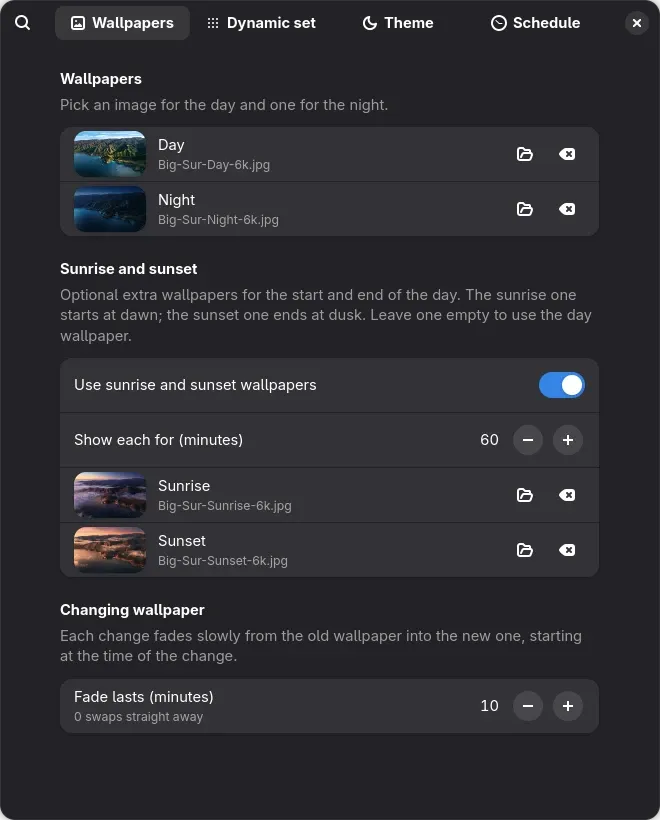
That became Dynamic Wallpaper, a GNOME Shell extension. You pick a day picture and a night picture, plus optional sunrise and sunset ones. The extension switches between them at the right moment, with a slow fade in between. You can also place any number of pictures around a 24-hour clock, or have it switch GNOME between light and dark style on its own schedule.
It was also my first time writing a GNOME extension, so a big part of the project was learning how GNOME Shell loads and runs extensions.
Technologies used
- JavaScript (GJS, GNOME’s JavaScript runtime) for both the extension and its settings window
- GTK 4 and libadwaita for the settings window
- GSettings to store the settings, shared by the extension and the settings window
- libgweather for offline city search, using the same city list as GNOME Weather
- GNOME’s own slideshow XML format to do the actual wallpaper changes
- A small test suite run with
gjs(56 tests), plus aMakefilefor testing, installing and packaging
Notable features
- Day and night wallpapers, switched at sunrise and sunset for your location, or at times you choose
- Optional sunrise and sunset wallpapers, starting at dawn and ending at dusk (an hour each by default)
- Slow fades between wallpapers, as long as you like (15 minutes by default)
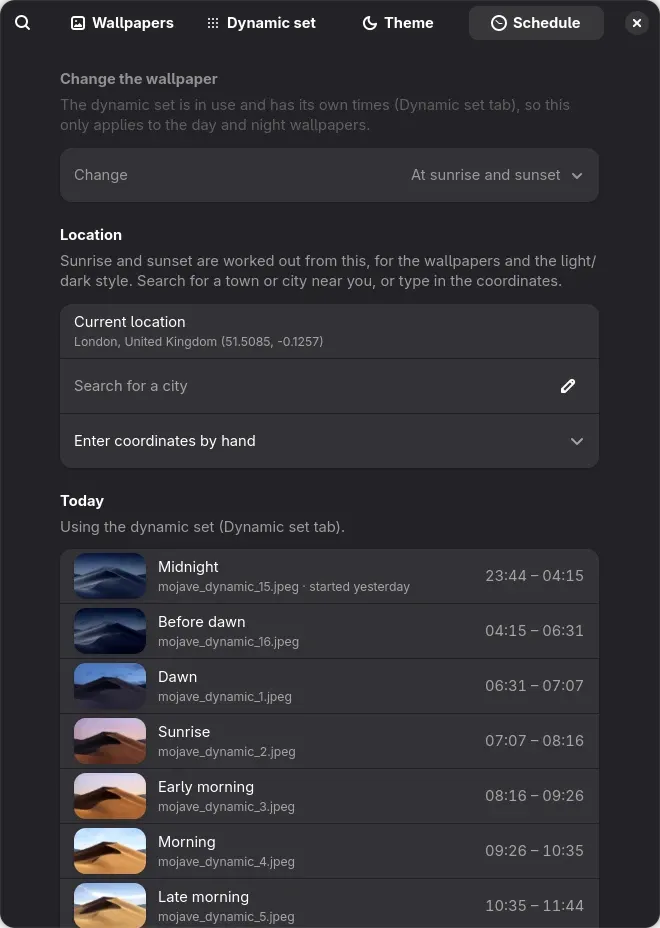
- City search that works offline, or type in the coordinates by hand
- A Dynamic set of any number of pictures placed around a 24-hour clock, by time of day or by the sun’s position, so they follow the seasons
- Presets, so you can save several dynamic sets and swap between them
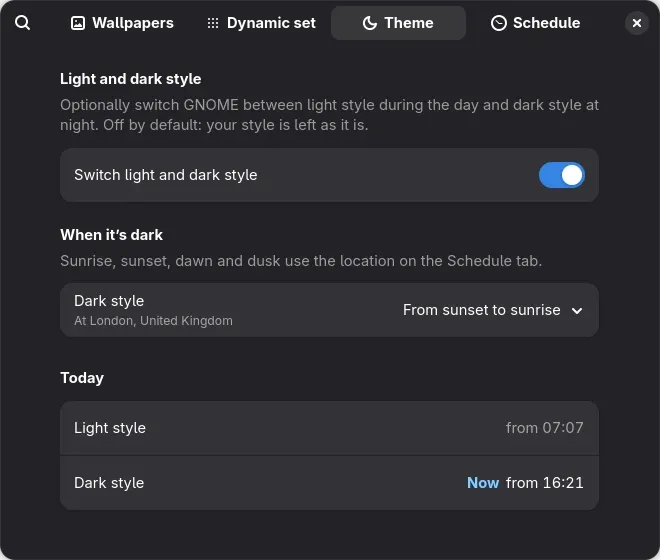
- Light and dark style switching, on its own schedule and off by default
- The right wallpaper shows from the moment you log in, with no flash of the old one
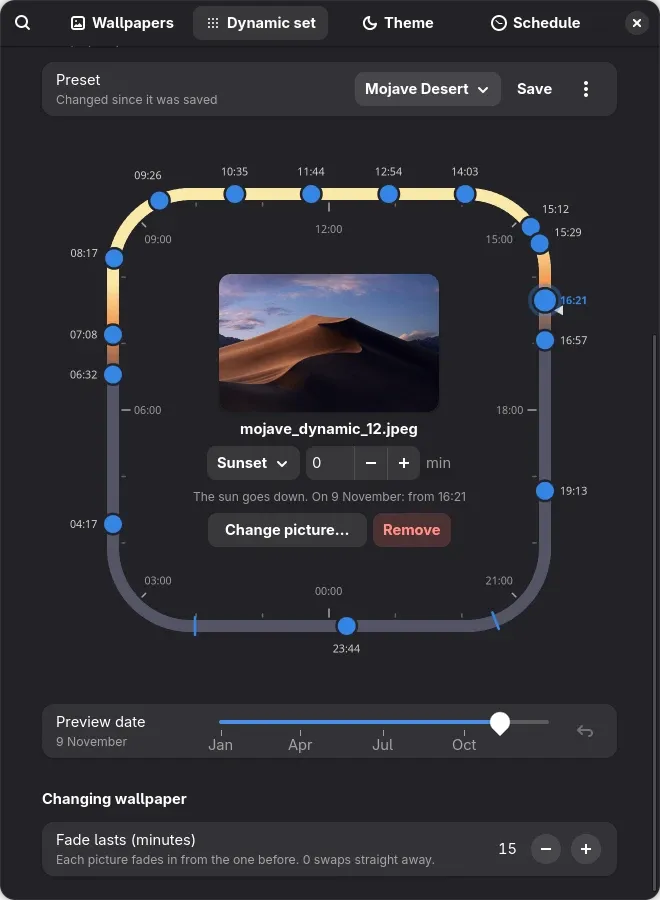
The Dynamic set clock is the most involved part of the settings window. The track is coloured by how high the sun is, and each dot is a picture. Dots can be dragged around the clock and snap to sun events like dawn, sunrise or dusk. The preview date slider shows how those times move through the year.
| Wallpapers | Schedule | Theme |
|---|---|---|
 |  |  |
How it works
Working out the sun
The sunrise and sunset maths uses the standard “sunrise equation”, which is accurate to a minute or two. Dawn and dusk are civil twilight, when the sun is 6° below the horizon. The awkward cases needed handling too: near the poles the sun may not rise or set at all, and far north in summer it never gets fully dark.
To decide which wallpaper should show, the code builds a list of changes for the days around today (e.g. “06:26 sunrise → 07:26 day → 16:01 sunset → 17:01 night”). It then finds where “now” falls in that list. Looking at several days instead of just today avoids special code for the tricky cases: just after midnight, nights that start after midnight, and time zones far from Greenwich.
Letting GNOME do the switching
My first version simply set a new wallpaper at each change. The problem was that GNOME draws the wallpaper at login before it starts any extensions. So you’d briefly see whatever was set when you last shut down, then a swap to the right picture.
The fix was to use a feature GNOME already has. Its built-in day/night wallpapers are really slideshow XML files that list pictures, how long each one shows, and how long the fade lasts. The extension writes one of these files for the next 24 hours and points the wallpaper at it. GNOME then works out the right picture from the clock as soon as it loads, does the fades itself, and keeps it right after sleep. The extension just rewrites the file at each change, so it never drifts as sunrise moves through the year.
Keeping it light
Wallpapers are often huge (the ones I use are 6K). The extension now makes screen-sized copies of each picture in the background and uses those in the slideshow instead. For a 6K picture, that cuts the memory GNOME needs for it from about 145 MB to about 15 MB.
Getting it ready to publish
Extensions on extensions.gnome.org are
reviewed by hand, and there are rules about what code running inside GNOME
Shell is allowed to do. For example, it shouldn’t block the desktop while
reading or writing files, so the extension reads and writes its slideshow
files asynchronously. Everything it sets up when it’s turned on also has to
be undone when it’s turned off. I ran it through shexli, a linter for
these rules, before uploading.
What I learned
- How GNOME Shell runs extensions. The extension runs inside the shell itself. A mistake can affect the whole desktop, and new code only loads after logging out and back in.
- Use what the platform already does. The slideshow approach removed a lot of code (timers, fades, catching up after sleep) and fixed the login flash at the same time.
- Dates and times are hard. Time zones, daylight saving and places where the sun doesn’t set all needed handling and tests.
- Building a custom widget in GTK 4. The 24-hour clock is drawn by hand with Cairo, and the dragging and snapping are handled in code too.
Files
The code is available in a GitHub repository, under the GPL-2.0-or-later licence, the same as GNOME Shell. The repository also includes a set of guides that explain how GNOME extensions work, how this one works, and how to build and release it.